
Create your first store in minutes

Run your entire business from one powerful platform.

Manage sales, purchases, inventory, invoices, expenses, customers, suppliers, and overall business performance — all from one connected platform.

No credit card requiredQuick setupBuilt for growing businesses

Barakain Digital

One platform for every store

Sales

  • POS
  • Orders
  • Returns

Inventory

  • Products
  • Stock
  • Warranty

Accounting

  • Expenses
  • Payments
  • Reports

Business Report

Sales, stock, and cash from every store in one report.

Sales

Inventory

Accounting

Manage every business with one login

Run multiple businesses from a single account. Switch between them easily, and give staff separate permissions so each person can only do the work they are responsible for.

Keep accurate stock for every product

Stock updates automatically as products are bought, sold, returned, or damaged. Track every item by batch and serial number, and check current stock anytime.

See all accounts and reports in one place

View detailed daily sales, purchases, profit, expenses, and outstanding balances. Create reports by day, month, or custom period and keep a clear picture of your business.

Features

Everything you need to run your business

Manage sales, stock, quotations, accounts, HR & payroll, automation, teams, warranties, and multiple stores from one connected platform.

Sales and customer management

  • Manage POS and regular sales with ease.
  • Store customer details and transaction history.
  • Track invoices, payments, and outstanding balances.
  • Run the entire sales process from one place.

Quotations

  • Create professional quotations for customers in minutes.
  • Convert accepted quotations into sales with one click.
  • Track quotation status, validity, and follow-ups.
  • Keep pricing, products, and customer details in one place.

Supplier and purchase management

  • Manage supplier details and transactions.
  • Handle purchases and purchase returns with ease.
  • Track supplier payments and outstanding balances.
  • Keep a complete purchase history.

Product and stock management

  • Manage products, categories, brands, and units.
  • Track stock by batch and serial number.
  • Automatically adjust stock for purchases, sales, returns, and damage.
  • Quickly identify low-stock and out-of-stock products.

Custom barcode label design

  • Design barcode labels to suit your needs.
  • Customize label size, layout, and information.
  • Add product name, price, SKU, barcode, and other details.
  • Print your designed labels directly.

RMA and warranty management

  • Store warranty details for every product.
  • Track warranties by serial number.
  • Manage RMA and return processes with ease.
  • Review the status and history of warranty cases.

Accounts and accounting

  • Keep track of business income and expenses.
  • Manage customer receivables and supplier payables.
  • Record payment and receipt transactions.
  • Get a clear view of your business's financial position.

Business reports and analytics

  • View detailed sales and purchase reports.
  • Analyze profit, income, expenses, and outstanding balances.
  • Monitor stock value and overall business performance.
  • Generate reports for any selected period.

HR and payroll

  • Manage employee profiles, roles, and employment details.
  • Track attendance and working hours for your team.
  • Run monthly payroll with salary and deduction records.
  • Keep HR and payroll connected to your business accounts.

Multi-store management

  • Manage multiple stores from one account.
  • Switch stores quickly from the bottom of the sidebar.
  • Grant access to specific stores according to permissions.
  • Manage each store's activity and data separately.

Mobile app

  • Manage sales and orders directly from your phone.
  • Check current stock levels at any time.
  • View customer, payment, and outstanding balance details.
  • Track key business reports and performance.

Business automation

  • Build workflows that react to sales, stock, and other events.
  • Send emails automatically when key business actions happen.
  • Use conditions and schedules to control when workflows run.
  • Monitor executions and email logs from one dashboard.

Document studio

  • Create document designs that match your preferences.
  • Customize different invoices and business documents.
  • Change logos, information, fonts, layouts, and other elements.
  • Use or print your finished designs directly.

Role-based access control

  • Create separate roles and permissions for employees.
  • Choose which pages and features each person can access.
  • Control permission to view, create, edit, and delete data.
  • Keep access secure according to each responsibility.

Audit log

  • Keep a record of who did what and when.
  • Track important changes and activities.
  • Review user actions and change history.
  • Maintain stronger control over business data.

Document Studio

Create every document in your business identity

Use your business logo, colors, fonts, and preferred design to create invoices, receipts, vouchers, and other documents your way. Choose from 25+ ready templates and arrange every part as you need.

No waiting for a designer, and no extra cost every time you change a design. Your business document design is now in your hands.
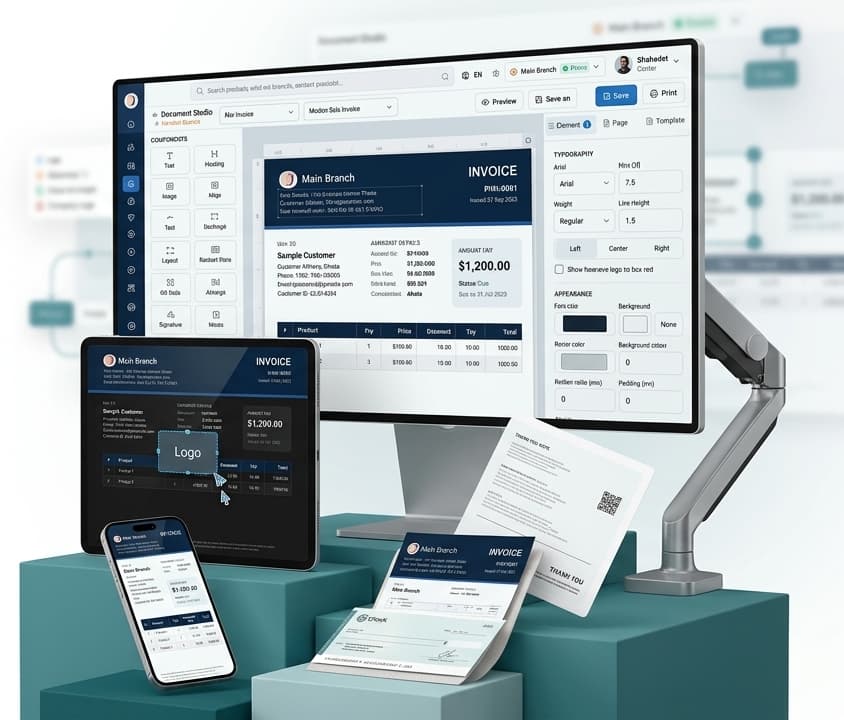
Document Studio editing a branded sale invoice

Pricing

Pay for the shops you scale.

Simple plans for shops of every size. Start free, then scale stores, users, and features as your business grows.

The plan list could not be loaded. A new account still starts with a free trial.

Frequently Asked Questions (FAQ)

General questions about Barakain

1. What is Barakain?

Barakain is a modern Business Management Software that lets you manage sales, purchases, stock, customers, suppliers, income and expenses, employees, and other business work from one platform.

2. What kinds of businesses is Barakain suitable for?

Barakain is built for many types of businesses, such as:

  • Computer shops and laptop showrooms
  • Mobile and electronics shops
  • Pharmacies and medicine shops
  • Hardware and electrical shops
  • Grocery and super shops
  • Decoration and other retail businesses
3. Do I need strong computer skills to use Barakain?

No. Barakain is designed to be easy to use. Basic computer or smartphone experience is enough to handle most tasks.

4. Is Barakain an online software?

Yes. Barakain is online software. With an internet connection, you can use your business data from a computer, laptop, or mobile.

5. Do I need to install any separate software?

No. You can use Barakain from a web browser on a computer or laptop. There is also a mobile app for Android users.

Account and business management

6. How do I start using Barakain?

Create an account on the Barakain website. Then add your business details and set up products and other required information to get started.

7. Can I manage multiple businesses from one account?

Yes. Depending on your plan, you can manage multiple businesses from one account and switch between them easily.

8. Can I manage multiple shops or branches?

Yes. With Multi-Store, you can manage sales, stock, and other operations for multiple shops or branches separately.

9. Can I create separate accounts for employees?

Yes. You can create separate accounts for your employees and decide which information they can see and which actions they can perform based on their work.

10. Can employees see data for every business?

No. You can set separate permissions for employees, so each person can only use the information and features they are allowed to access.

Sales, stock, and accounts

11. Does Barakain include POS?

Yes. With POS, you can sell products quickly, create invoices, take payments, and keep sales records.

12. Does stock decrease automatically when I sell a product?

Yes. Product quantities update automatically with sales, purchases, returns, and other stock changes.

13. Can I use product barcodes?

Yes. You can create product barcodes, design custom barcode labels, and print them. Barcodes also make product identification and selling easier.

14. Can I track stock by serial number and batch?

Yes. You can store and track product batches and serial numbers as needed.

15. Can I track customer dues and supplier payables?

Yes. You can keep detailed records of how much customers owe you and how much you need to pay suppliers.

16. Can I track business income and expenses?

Yes. You can record daily income, expenses, payments, and other financial transactions.

17. Can I see profit and sales reports?

Yes. You can view sales, purchase, profit, expense, dues, and stock reports. Create reports for a selected period to understand your business position.

Special features

18. Does Barakain include warranty management?

Yes. You can store warranty periods and serial numbers, and manage product returns, service, and RMA under warranty.

19. Is EMI available?

Yes. You can manage customer EMI sales and installment records, including installment amounts, payments, and dues.

20. Can I manage employee attendance and payroll?

Yes. With HR & Payroll Management, you can manage employee details, attendance, salaries, bonuses, and deductions.

21. Can I design invoices the way I want?

Yes. With Document Studio, you can design invoices and other business documents using your logo, colors, fonts, information, and layout.

22. Does Barakain include automation?

Yes. With Business Automation, you can set certain business tasks to run automatically based on events, conditions, and schedules.

23. Can I manage my business from mobile?

Yes. With the Android app, you can view and manage sales, stock, customers, payments, and key business information from your phone.

24. Can I see who changed what and when?

Yes. Audit Log lets you review important user actions and change history, making it easier to monitor employee work.

Pricing, setup, and support

25. Do I need to pay a monthly charge to use Barakain?

Barakain offers different plans. You can choose a monthly or yearly plan based on your business needs. Full pricing and benefits are listed in the Pricing section.

26. Is there a setup fee for new accounts?

Creating a regular account does not require a separate setup. If you want our team to upload products, migrate data from old software, or handle special setup, a setup charge may apply.

27. Can I move product data from old software into Barakain?

Yes. If your old product data is available in Excel or another supported format, our team can help add it to Barakain.

28. Is training available for using Barakain?

Yes. You can get the help you need from our team to start using Barakain. There are also guides and tutorials for different features.

29. How can I get support if I face a problem?

Whenever you face any issue while using Barakain, our support team is ready to help. You can get quick solutions through Live Chat, direct phone calls, and remote support via AnyDesk. When needed, our team can connect directly to your computer and help resolve the problem.

30. Can I change my plan later?

Yes. As your business needs and user count grow, you can upgrade to a suitable plan based on each plan's features and limits.

31. Will Barakain be suitable for my business?

You can use Barakain features based on your business type and needs. Contact our team to learn which plan is the best fit for you.